
A CRM built for a wine agency
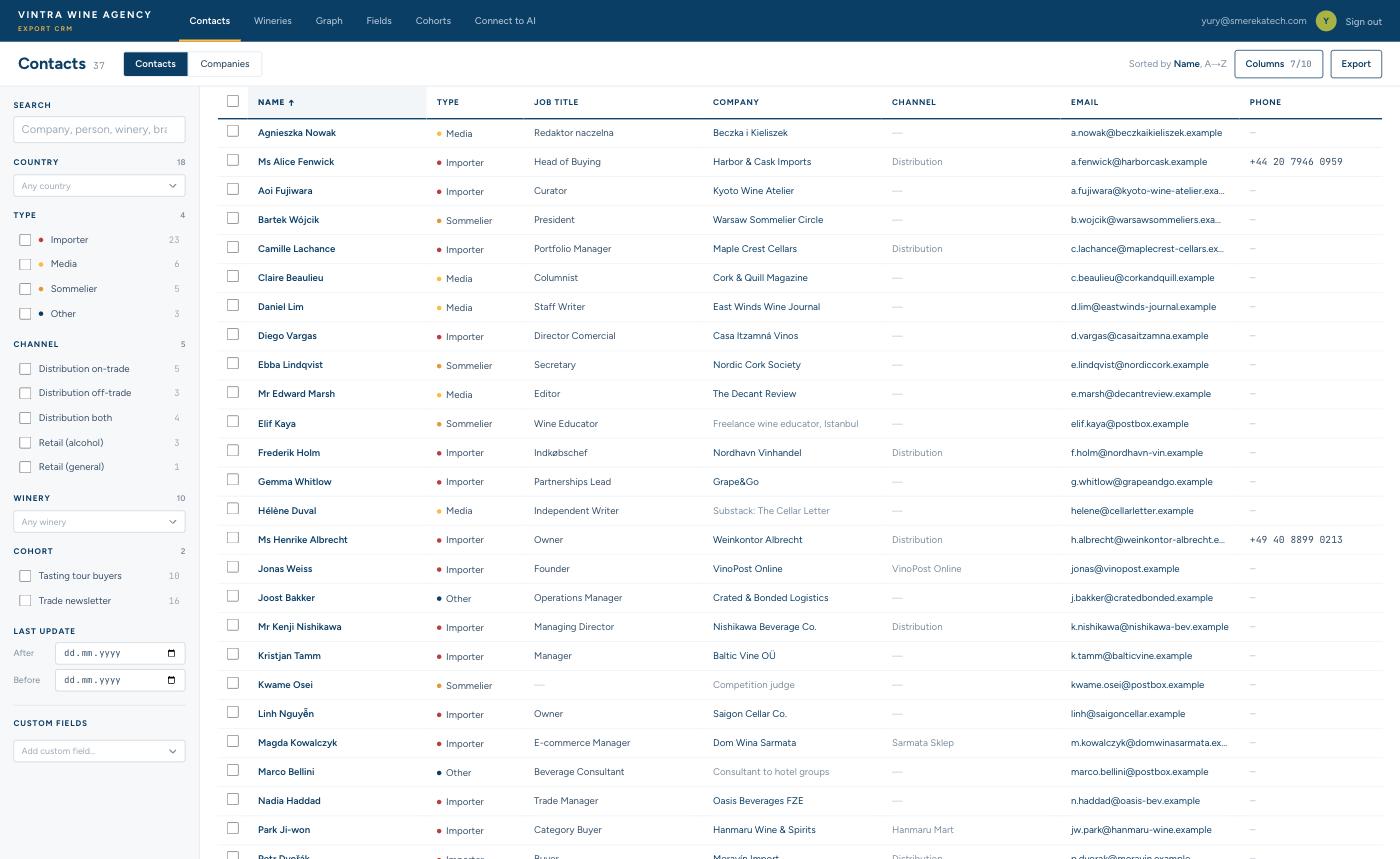
The agency managed its contacts, matched wine producers with importers, and organised trips across a collection of spreadsheets. We brought that work together in a CRM of its own, which it now uses in place of Excel.
We built the system in two iterations over three calendar weeks. AI brought development costs down substantially, making a custom system a practical choice. The agency can add its own fields as new needs arise, and the software can evolve with the business.
The agency and its work
The agency helps wineries find a foothold in new markets and importers find producers for their portfolios. It also organises visits to wineries and helps prepare for wine trade shows.
Contacts, company details and the history of those relationships were spread across numerous Excel files. Two parts of the job made that especially difficult.
Finding the right partners
An importer might need wines within a particular price range, available for shipment from a European warehouse. To find suitable producers, the agency had to check them individually, piecing together information from spreadsheets, notes and websites.
The same process worked in reverse: a winery wanted to enter certain markets, and the agency needed to identify importers whose portfolios would suit its wines. Some details were held in memory; the rest had to be found and compared each time.
Organising a trip and following up
Each trip meant selecting importers, gathering participants’ contact details and checking practical arrangements: visas, food allergies, or whether someone wanted to stay longer for additional meetings. All of this went into a separate spreadsheet, maintained by hand.
The work continued after everyone came home. Had an importer found what they were looking for? Which producers had they met? Which conversations led to agreements, and what came of those agreements? Before planning the next trip, the agency needed to revisit those results. Understanding its history with a single importer meant gathering information from several files.
Why build a custom CRM?
Choosing an existing CRM still takes work: finding the right product, configuring it and learning to use it. As the agency develops, its needs may also outgrow what that product can accommodate.
AI made custom development substantially less expensive, giving us the opportunity to build around the agency’s work from the outset. As its processes change, the system can change with them.
Built around the agency’s work
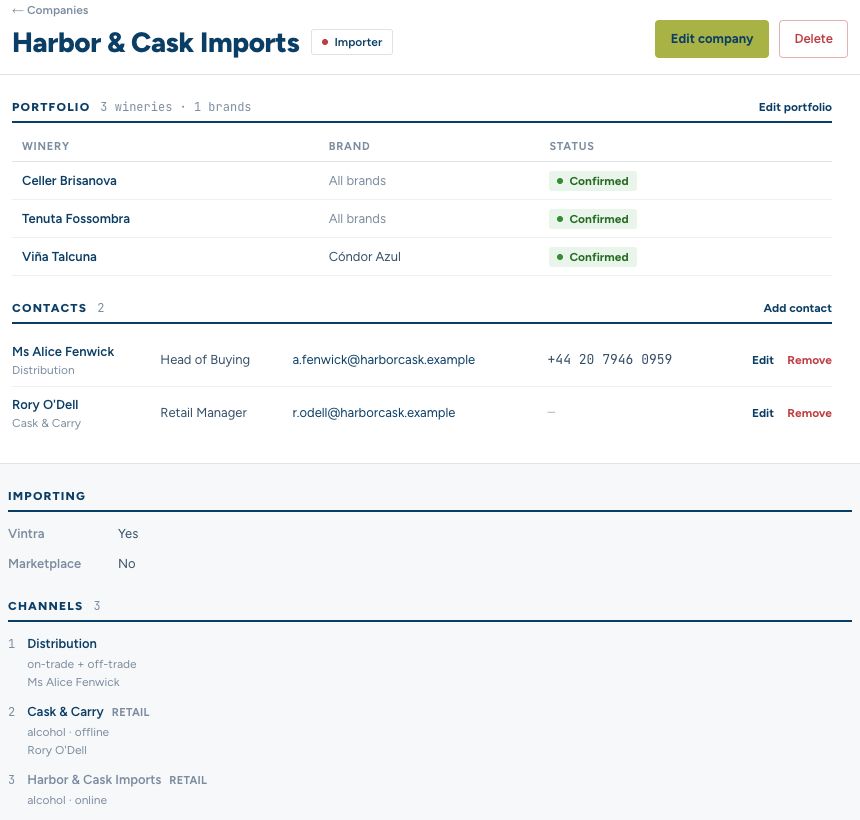
The CRM brings together companies, people, wineries, brands and the relationships between them. An importer’s page shows its contacts, sales channels and portfolio of wineries and brands. A winery’s page shows the companies that represent its wines.
Take the request for wines in a certain price range, available from a European warehouse. The agency manager can describe it to a connected AI assistant and ask for a shortlist of suitable companies.
The agency can add the fields it needs for these searches. If a brand’s price becomes relevant, for example, the manager can create a field and enter the information. The assistant works with the data already recorded: missing details still need to be checked and added.
Each trip gets its own information
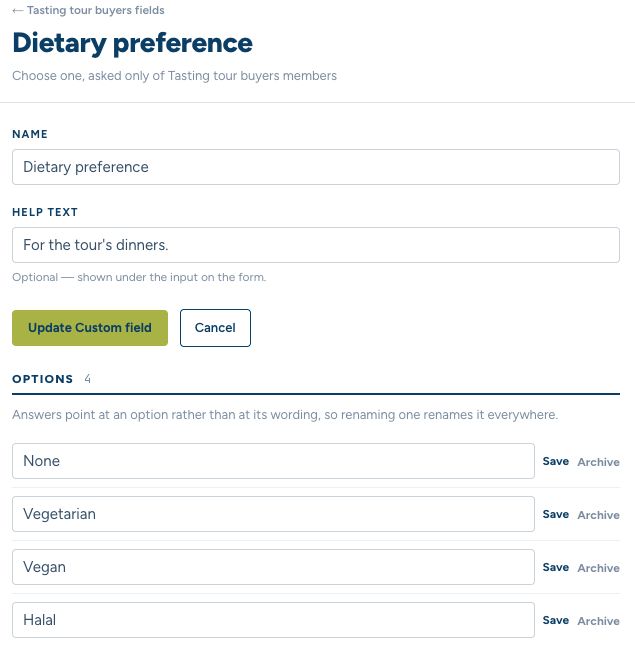
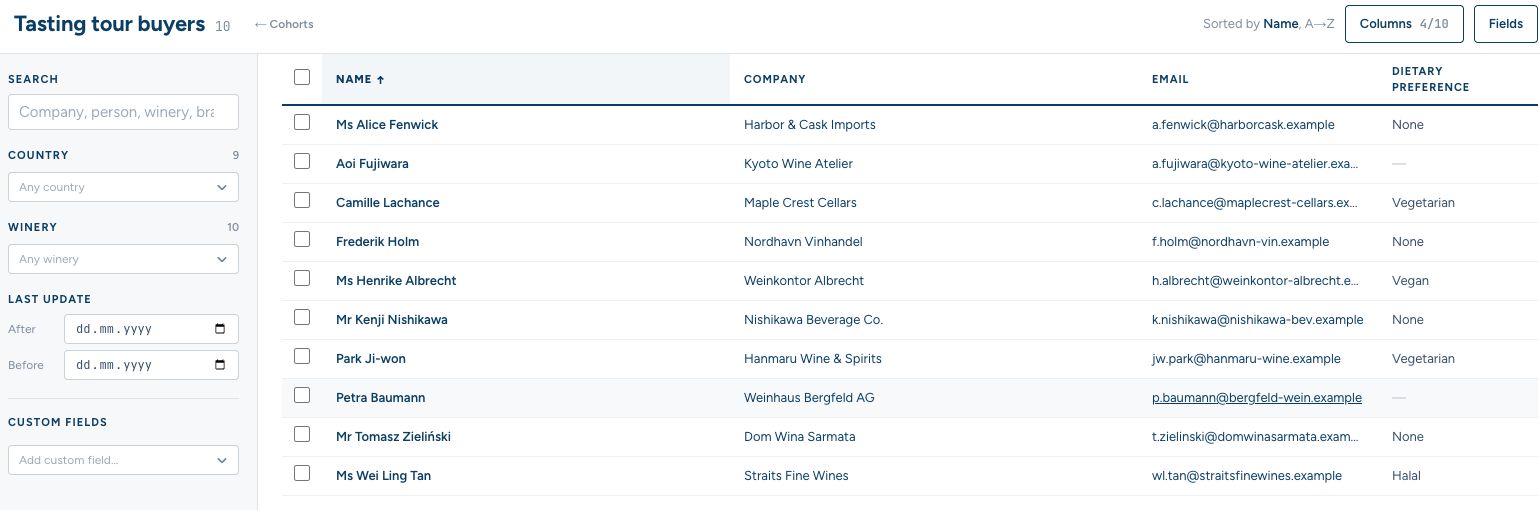
For a trip, the agency creates a group of participants with their contact details and the information needed to organise the visit: visas, food allergies and plans for extra meetings. Those fields belong to that group, so they do not clutter everyone else’s records.
If a new question comes up during planning, the manager can ask the AI assistant to add a field for the group. The assistant can also enter and update information, so routine changes do not require a developer.
Moving and checking the data
We used an AI assistant to transfer the data from Excel and checked it against the original files. The database structure and CRM rules enforce required fields and valid relationships: a contact, for example, cannot refer to a company that does not exist. Automated tests check the system after each change, including its data controls:
- Checking imports: records, values and relationships are compared with the source files. Missing information, duplicates and inconsistencies are flagged for human review.
- Checking AI actions: after an individual edit, the assistant reports what it saved. Before bulk changes or deletions, it asks for confirmation. When a request is ambiguous, it asks for clarification.
- Change history: changes can be traced and mistakes reversed, taking subsequent edits into account.
The database can protect the structure of the data, but it cannot tell whether a price or name is correct. That still requires comparison with the source and human review.
Shaped by actual use
After the first conversation with the client, we built an initial version and the agency started using it. At the second meeting, we could discuss experience with the system: what worked well, what was missing and how the information could be organised more clearly.
That feedback also helped refine the CRM’s structure. The first version used tags for classification. During the second conversation, it became clear that some of those tags represented company types, contact types and sales channels. In the next version, those became dedicated fields.
Work on the current version spanned three calendar weeks, with activity on ten separate days: around eleven hours of developer time and seventeen hours of AI work.
What has changed
The agency has stopped turning to its Excel files and now works with its data in the CRM. It is already using the system to plan its first importer visit to producers, bringing together the participants and the details needed to prepare.
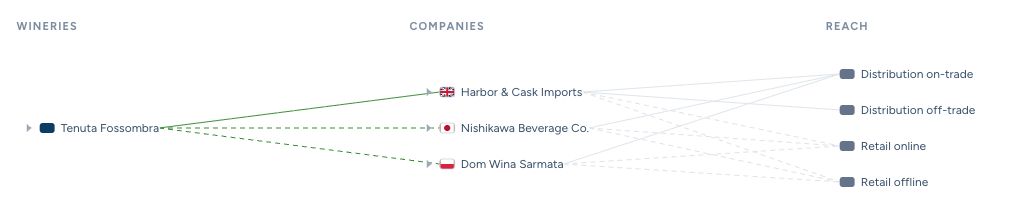
The agency also uses a relationship graph when matching partners. It traces a bottle’s route from producer to shelf, showing which importer represents the wine and the sales channels through which it reaches the market. Connections that previously had to be pieced together by hand are visible in a single diagram.
Running and maintaining the system
Day-to-day use currently requires no developer involvement. The additional recurring cost is $3 a month for the server. For AI features, the agency uses its existing assistant subscription.
If another developer needs to take over maintenance or further development, the handover materials are already in GitHub: the code, an infrastructure overview and instructions for setting up a development environment, deploying the system and updating it. The small codebase and documentation make it easier to get acquainted with the system, while automated tests help check changes.
Access to the repository and infrastructure gives a new developer what they need to get started.
Let’s talk about your work
Show us how you work today and what you would like to make easier. Together, we’ll identify a starting point for a first working version within a few weeks, built around the way your business operates.